

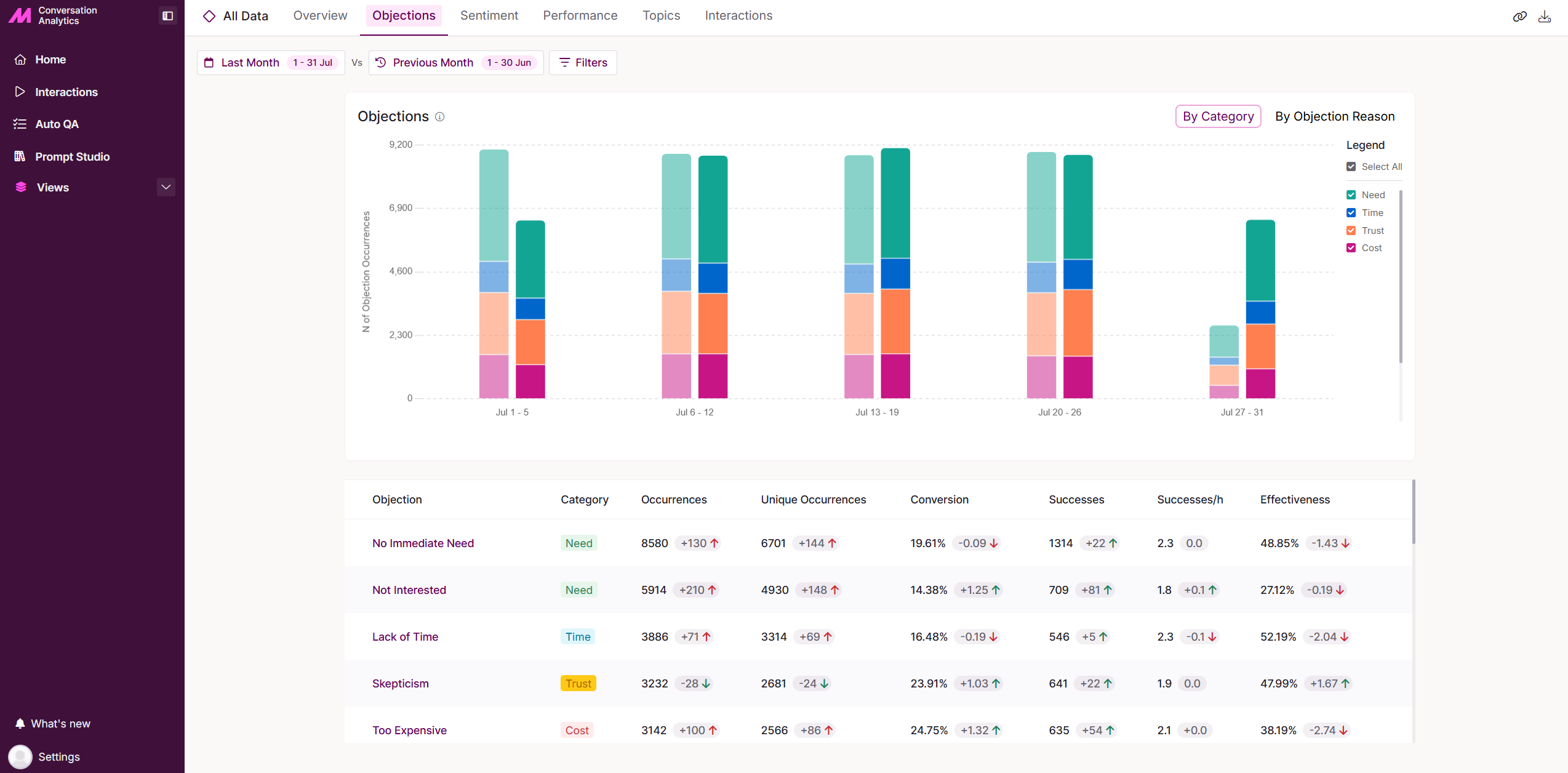
Objections
The Objections tab lets you review objections identified within calls and see how effectively agents handle them.
Time Period and Filters bar
At the top of the page, you can set the date range and comparison window for the data shown. Use the Filters panel to narrow the results and focus on specific call details.
Once applied, you can save your filters as a custom view. See the Views guide for more detail.
Objections Chart
This chart displays the frequency of different customer objections identified within your selected filter view. Objections are grouped into four main categories:
| Category | Description |
|---|---|
| Need | The caller isn't convinced the product or service is necessary. Example: "I don't think we need this right now." |
| Time | The caller feels it's not the right time to move forward. Example: "Maybe in a few months." |
| Trust | The caller is uncertain about the product or service's reliability or effectiveness. Example: "How do I know this will work for us?" |
| Cost | The caller perceives the price as too high or outside their budget. Example: "It's not within my budget." |
You can also view the data by Objection Reason, allowing for deeper analysis of the specific types of objections raised.
Objections Table
Beneath the chart, the Objections table provides a detailed breakdown of the information shown above, including comparison indicators highlighting increases or decreases in key metrics against your selected comparison date range.
| Field | Description |
|---|---|
| Objection | The specific objection identified within the calls. |
| Category | The category the objection falls under. |
| Occurrences | The total number of times the objection was detected across all calls. |
| Unique Occurrences | The number of individual calls in which the objection was detected. For example, there may be 10 total occurrences of an objection, but only 2 unique occurrences if it appeared 4 times in Call 1 and 6 times in Call 2. |
| Conversion | The percentage of calls with an identified objection that resulted in a successful outcome. |
| Successes | The number of calls that were dispositioned with a success result code. |
| Successes/h | The average number of successful calls per hour. |
| Effectiveness | A measure of how well the agent handled the objections raised during the call. |
Hovering over a segment of the chart reveals more detailed trend analysis, and gives you the option to select View Interactions to review the specific calls associated with a particular Objection Category or Objection Reason.
Objection Summary
Selecting an objection reason in the table opens a detailed view for that specific reason. The chart shows the number of successful versus unsuccessful outcomes.
In the Handling tab, you'll see a leaderboard of the most and least effective users. This helps you identify who excels at resolving specific objections, and who may benefit from additional coaching or support.