
Changing Skill Groups via List Data Manager
To change the Skill Group of contacts in bulk, use List Data Manager. This works alongside all the standard and advanced filters already available on the page, so you can target exactly the contacts you need. You'll find it under Data > List Data Manager.
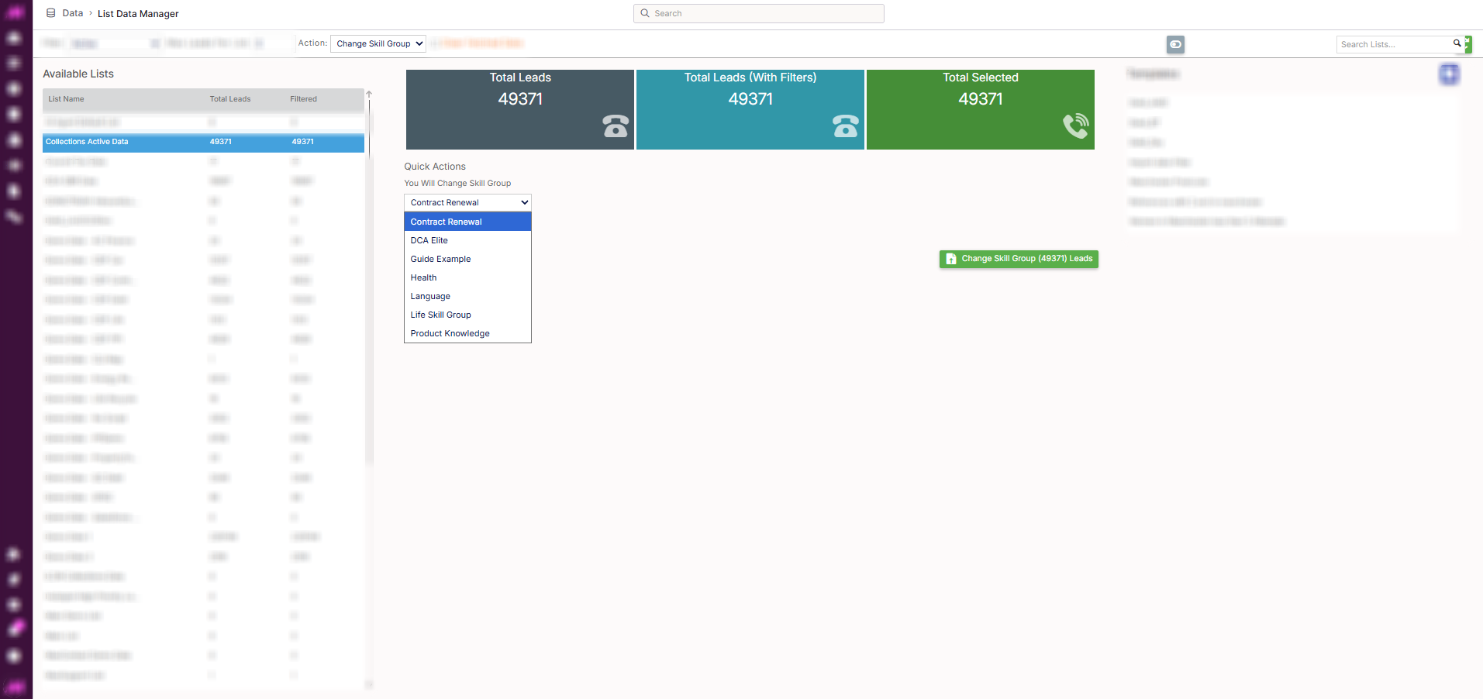
Changing a Skill Group
- Select Change Skill Group from the Action dropdown.
- Select the list or lists you want to update.
- Choose the Skill Group you want to assign to the contacts on the selected list or lists.
- Select the button to apply the change.
Note. This changes the Skill Group for every active contact on the list or lists you select, not just a subset, unless you narrow this down with filters first.
Targeting specific contacts
Advanced filters still apply here, so you can change Skill Groups for a specific subset of leads rather than a whole list. For example, you could target only leads whose postcode begins with M34 and who drive a car valued over £20,000.
You can also filter contacts by Skill Group ID, which is useful for finding everyone currently assigned to a particular Skill Group before changing them.