
How to Block an Inbound Caller
The Inbound Deny List diverts calls from specific numbers to a designated IVR, keeping particular callers away from your standard call routing. You'll find it under Centralised Settings > Inbound Deny List.
Prerequisites
Before adding an entry to the Deny List, make sure the following are in place.
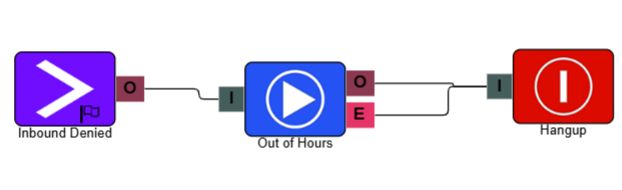
IVR setup
You need an IVR configured to handle diverted calls. The setup is entirely up to you. For example, you might route the caller to an out-of-hours message before the system ends the call automatically.
Required permissions
- Portal Access
- Settings - Inbound Deny List
- Inbound Number Configuration
Caller number
Have the caller's phone number ready in its full format before you add it to the Deny List.
Blocking an inbound caller
- Navigate to Centralised Settings and select Inbound Deny List.
- In the top-right corner, select Add to create a new row in the Deny List.
- Complete the entry fields, then select Save. The entry is added to your system's Deny List.
| Field | Description |
|---|---|
| Telephone No.* | The phone number you want to divert away from your standard inbound routing. |
| Divert to IVR* | The IVR that calls from this number are directed to. |
| Notes | Optional context for the entry, useful for tracking why it was added. |
* Required field
Any subsequent inbound calls from a recognised number are automatically diverted to the IVR specified in its Deny List entry.
Additional uses
Use the Deny List to test an IVR configuration before it goes live. Route specific numbers through the new IVR setup without affecting live call handling.