
Camp Check
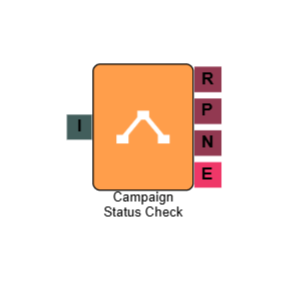
The Camp Check element checks the current status of a selected campaign and routes the call accordingly. This lets you build IVR flows that respond dynamically to whether a campaign is running, paused, or stopped — for example, routing callers to a queue when agents are active, or to an out-of-hours message when the campaign is not running.
Connections
| Connection | Description |
|---|---|
| I – Input | The entry point for this element. Connect from the preceding element in your IVR flow. |
| R – Running | The path taken when the selected campaign is currently running. |
| P – Paused | The path taken when the selected campaign is currently paused. |
| N – Not Running | The path taken when the selected campaign is stopped. |
| E – Error | The path taken if the element encounters an error — for example, if the campaign cannot be found. |
Settings
| Field | Description |
|---|---|
| Name | Give the element a clear name so it is easy to identify within your IVR flow. |
| Description | Optional. Add a note to explain the element's purpose — useful in more complex flows. |
| Agent Can See This | When enabled, agents can transfer a live caller directly to this element via the IVR Transfer option. |
| Supervisor Can See This | When enabled, the element is visible in the IVR Transfer list for users with a Supervisor role. It remains hidden from all other users. |
| Result Code | Assign a result code to this element to track calls that pass through the camp check. |
| Campaign | Select the campaign whose status you want to check. The element will evaluate this campaign's current state each time a call reaches it. |