
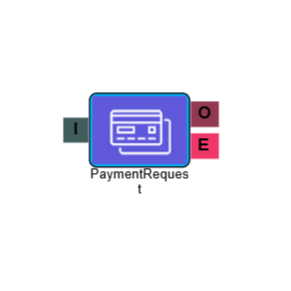
Payment Request
Part of the payment engine. Allows connection to a payment engine to complete an IVR transaction.
Connections
| Connection | Description |
|---|---|
| I – Input | The entry point for this element. Connect from the preceding element in your IVR flow. |
| O – Output | The path taken when the payment request has been successfully processed. |
| E – Error | The path taken if the element encounters an error. |
Settings
| Field | Description |
|---|---|
| Name | Give the element a clear name so it is easy to identify within your IVR flow. |
| Description | Optional. Add a note to explain the element's purpose — useful in more complex flows. |
| Agent Can See This | When enabled, agents can transfer a live caller directly to this element via the IVR Transfer option. |
| Supervisor Can See This | When enabled, the element is visible in the IVR Transfer list for users with a Supervisor role. It remains hidden from all other users. |
| Result Code | Assign a result code to this element to track calls that pass through it. |
| Phrase | Select a phrase or music to play while the request is being processed. Sometimes the transaction will be so quick it won't have time to play. |
| Timeout | Set the time in seconds for timing out the element's action if it cannot be completed. Timing out is considered an error and the call will follow the Error (E) path. |
| End Point | Set the payment service destination to use for transactions, for example Worldpay. |
| Credit Card | Enter the name of the Secure Capture Digits element used to capture the customer's card number. Must be entered exactly as written on the element, including capitalisation. |
| CVC/CVV | Enter the name of the Secure Capture Digits element used to capture the customer's CVC or CVV. Must be entered exactly as written on the element, including capitalisation. |
| Expiry | Enter the name of the Secure Capture Digits element used to capture the customer's card expiry date. Must be entered exactly as written on the element, including capitalisation. |
| Amount | Enter the name of the Secure Capture Digits element used to capture the payment amount. Must be entered exactly as written on the element, including capitalisation. |