What's new for Contact Hub for 7.10.0 Release?
- Pre-Chat Responses. Past web chats opened from My History or Contact History now show their own pre-chat answers in the Pre-Chat Responses tooltip. Before, the tooltip showed answers from the chat you had open, so you could read one customer's details while looking at another customer's interaction. The tooltip now matches the chat in front of you. A past chat with no pre-chat answers shows none. Email, SMS and WhatsApp history work as before.
- Script Callbacks. Script callback buttons now follow the current settings on their outcome code. Before, a button kept the settings from when the script was built. If you later switched on "Redial another number", the redial options didn't appear, callbacks saved without redial details and some leads were left uncallable. Buttons now pick up changes automatically in Contact Hub. You don't need to rebuild your scripts.
- Call Queue. Agents could be left showing Ready but receiving no calls when a caller hung up during the zip tone. They couldn't go Not Ready or log out cleanly until they logged off or were removed. This is fixed. If the caller hangs up during the zip tone, the agent now goes straight back into the queue and takes the next call. No action is needed.
What's new for Manager Portal for 7.10.0 Release?
| List Data Manager | |
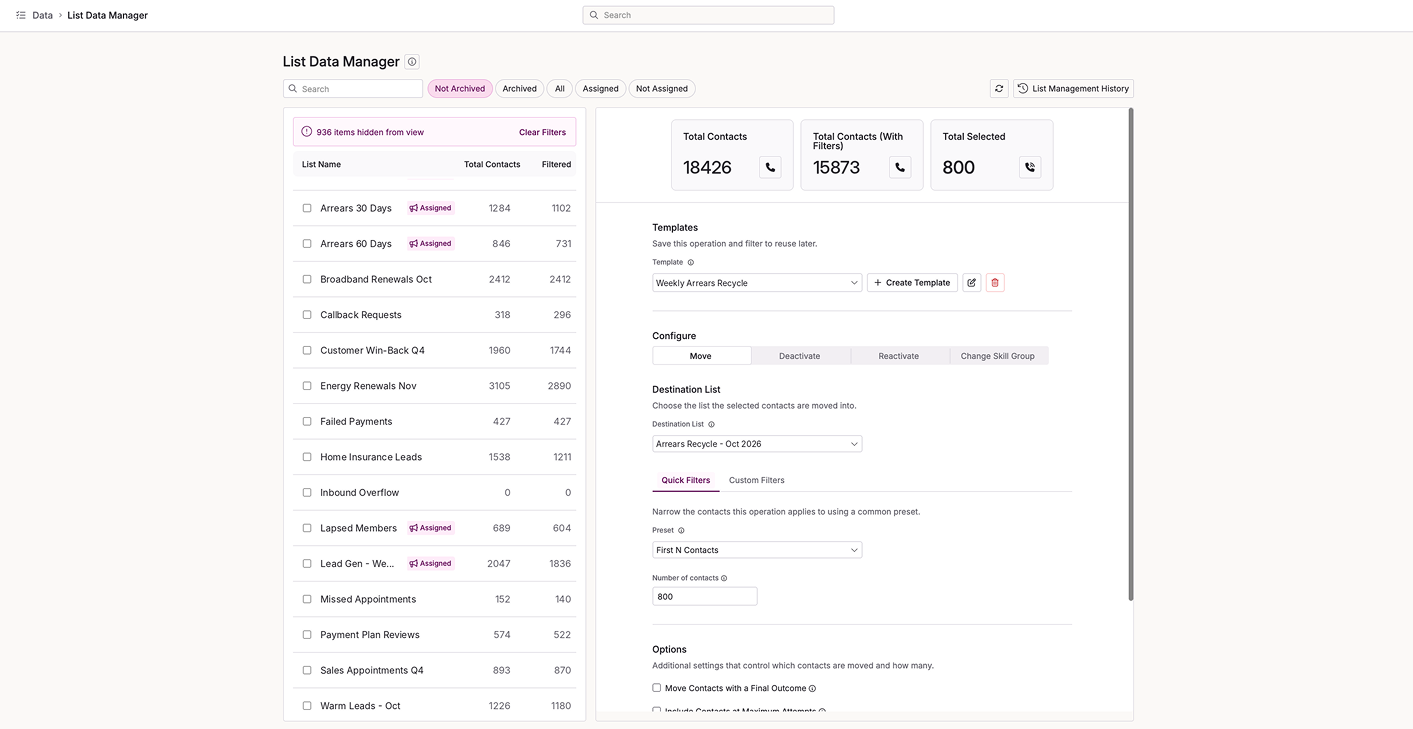 | List Data Manager now lives in Management Hub. If you open List Manager from the older Manager Portal, you'll land on the Management Hub page automatically, so your bookmarks and menu links keep working. There's nothing you need to do. You'll find all your lists in one place, in the same home as the rest of your management tools. |
- List Data Manager Templates. Templates saved on the old List Data Manager page with Custom Filters now keep their rules. Before, they opened with an empty filter, so counts and actions covered more contacts than you intended. Your conditions, nested AND/OR groups and blank checks now load into the builder, and counts, actions and runs all use them. Operations on these templates will now act on a narrower set of contacts, so check your saved templates before you run them.
- List Data Manager Actions. The List Data Manager lock icon now updates as it happens. Previously, a list stayed locked on screen after another user's action finished, failed or was cancelled, and you had to refresh to see it clear. The icon now appears when someone starts an action and clears when it ends, and a page you open mid-action shows the right locks straight away. You don't need to do anything.
- Destination List. List Data Manager no longer freezes on accounts with thousands of lists. The Destination List now shows only the lists on the tab you're viewing, so archived lists stay out of Active. It loads 100 options at a time, and search finds any list on the tab. The list panel also loads 100 rows at a time and brings in more as you scroll. The default status filter reads Active again. If you tick your chosen destination as a source, the destination now clears, so a list can't be moved into itself. The list panel scrollbar now matches the content panel.
- Campaign Manager. The Campaigns & Lists panel in Campaign Manager used to go blank when you collapsed a group. It now keeps showing your campaigns and lists, so you can tidy up the view without losing sight of your work. You don't need to do anything. The fix is already in place.
- Campaign Manager Access. Users with access to Campaign Manager but not the Lists page were sent to a "You don't have permission to view this page" error as soon as Campaign Manager opened. Campaign Manager now loads its own lists and list settings, so those users see their campaigns and lists straight away. If a list's settings can't load, List Details shows an error and turns off Save, so default values never overwrite your real settings. The Lists page stays restricted. We've also returned the campaign row expand arrow to its original borderless look.
- Campaign Grouping. Adding a campaign to an existing group from its row in Campaign Manager didn't work. When you picked the group, the campaign came up unticked, so Save changed nothing. It now appears alongside the group's current members, once only if it's already in the group, and Save adds it. We've also fixed an issue where renaming a group and changing its members in one Save could lose one of the changes. Both now always apply.
- Live Stats. We've made live stats more stable under heavy traffic. Previously, a busy contact centre could trigger a flood of repeat updates for the same campaign, team, user, queue or channel. Each one now updates once per cycle with everything that changed. We've also fixed three faults that could stop stats updating, including one at startup and one around the midnight reset. No action is needed.
- Import API Templates. Templates saved in Management Hub's List Data Manager now keep their custom filters when you use them as post-import actions on the Import API.
- Date Filters. List Data Manager now handles date filters correctly, whatever your regional settings. Before, a date with a day above 12 could fail to load, and a day of 12 or below could be read as the month. Counts now match the dates you pick. If counts can't load, you'll see a clear "Counts not loaded" message instead of zeros, the run button is held with a reason, and Apply Filter lets you try again.
- IVR Overview. The IVR Overview report now counts calls to wildcard inbound numbers. Before, calls that came in through a wildcard number were left out, so your totals for those numbers looked lower than they should. They now appear alongside your other inbound numbers, and the report reflects your full call volume. No action needed.
- Recording Playback. Recordings opened from the Management Hub menu sometimes wouldn't play. The page was looking for the audio in the wrong place. We've corrected that, so recordings now play whether you reach Recording Playback from the menu or go to it directly. Playback in QA and Record History works properly too. You don't need to do anything.
- Callback Manager. The Callback Manager grid was slow to load, and in some cases took over a minute. It was counting reschedules for every callback, though the grid never showed that figure, and it sent the same request twice when you opened a single agent's callbacks. We've removed both, so the grid loads faster and makes one request each time. You don't need to do anything.
- Platform Info. Platform Info had dropped out of the Admin menu in Management Hub, so you couldn't open the System Info area from where you'd expect to find it. It's back. You'll see Platform Info listed in the Admin menu again, and you don't need to change anything or take any action.
- Settings Navigation. Opening Settings in Management Hub used to send you straight out to Manager Portal. That's fixed. Settings now opens on the first settings page Management Hub actually serves, so you stay where you started. Clicking General still takes you to Manager Portal, as intended, until that page moves across. You don't need to do anything.
- Settings Access. Some users could see Calling Time Rules in the Settings menu but hit an error page when they clicked it, unless they also held the General settings permission. That's fixed in Management Hub and Manager Portal 1. The Settings cog now appears for anyone who can open at least one Settings section, and each user sees only the sections their own permissions cover. If someone follows a link to a section they can't open, they land on the first one they can. They only see an error page if they can open none. We've also restored the System Activity menu item name. No action is needed.
- Telephony API. Integrations that dispose calls through the Telephony API with result codes hidden from agents were being rejected with a "not found" error since version 7.9.0. That's fixed. Active hidden codes are accepted again, as they were before. Inactive codes and unknown codes are still rejected. If you made codes visible to agents as a workaround, you can now set them back to their original visibility. Check the recorded call outcome on your next disposed calls.
- Public Callbacks. Making a callback public in the Callback Manager used to leave it queued, and the clean-up for broken callbacks could pick it up and redial the Contact before the agreed time. Make Public now removes the callback straight away, so the Contact is only called when they expect it. Callbacks you don't make public work exactly as before. You don't need to do anything.
- Callback Redial. Making a callback public in Callback Manager could cause the system to redial that Contact earlier than agreed. That's now fixed. Make Public removes the callback from the Contact's scheduled personal callbacks, so the cleanup that catches broken callbacks leaves it alone. Your Contacts are called back at the time you promised, and you don't need to do anything.
 | As well as the highlighted areas above, infrastructure improvements to enhance the overall product architecture have been included, ensuring better performance, reliability, and scalability, as well as a number of performance enhancements to boost stability and resilience. |
 | New additions are currently in the beta phase of production. You may see this icon for areas containing these features and changes within the product. |