
Blackout Days
The Blackout Days element lets you define specific dates — such as bank holidays or planned closures — where inbound calls should be routed differently. When a caller reaches this element on a configured date, they are directed down the True (T) path. On any other date, the call continues down the No Match (N) path as normal.
Place this element near the start of your inbound IVR, before any Time Check element, so that closure dates are handled before opening hours are assessed.
Connections
| Connection | Description |
|---|---|
| I – Input | The entry point for this element. Connect from the preceding element in your IVR flow. |
| T – True | The path taken when today's date matches one of the configured blackout dates. |
| N – No Match | The path taken when today's date does not match any configured blackout date. The call continues through your standard IVR flow. |
Settings
| Field | Description |
|---|---|
| Name | Give the element a clear name so it is easy to identify within your IVR flow. |
| Description | Optional. Add a note to explain the element's purpose — useful in more complex flows. |
| Agent Can See This | When enabled, agents can transfer a live caller directly to this element via the IVR Transfer option. |
| Supervisor Can See This | When enabled, the element is visible in the IVR Transfer list for users with a Supervisor role. It remains hidden from all other users. |
| Result Code | Assign a result code to this element to track calls handled on blackout dates. |
| Blackout Days | Click Add to add a date to the element. Use the date picker to select the date you want to configure as a closure. You can add up to seven dates per element. To cover more than seven dates, add a second Blackout Days element to your flow. |
Example
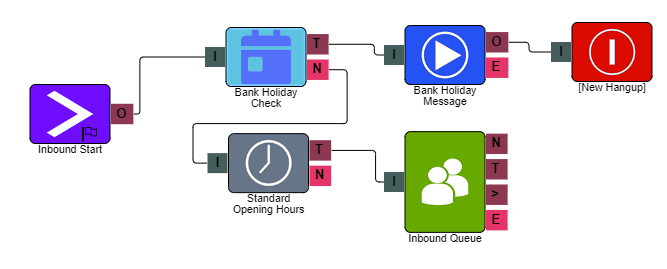
In the example above, the Blackout Days element is placed at the start of the IVR, before the opening hours Time Check. When a caller rings in on a configured bank holiday, the call is routed to a pre-recorded bank holiday message via the True (T) path. On any other date, the call follows the No Match (N) path and continues into the standard IVR.