

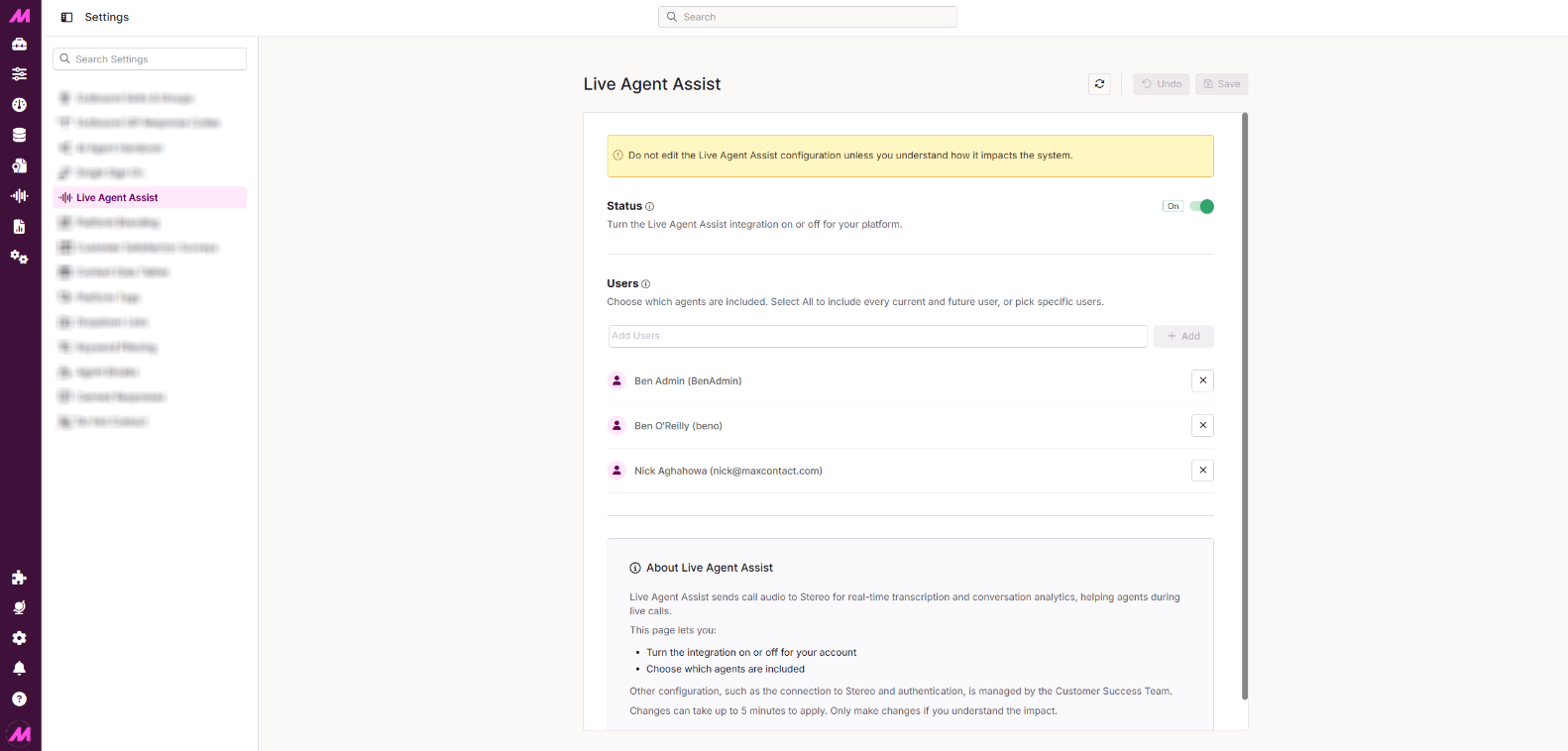
Live Agent Assist Settings
Overview
The Live Agent Assist Settings page lets you control which agents are included in the Live Agent Assist integration and whether the integration is active for your system. It is found in Centralised Settings > Live Agent Assist and is only accessible if the feature has been enabled for your system.
Live Agent Assist sends call audio to Stereo for real-time transcription and conversation analytics, helping agents during live calls. Other configuration — including the connection to Stereo and authentication — is managed by the Customer Success team. Contact them if you need changes outside the scope of this page.
Page Controls
Three buttons appear at the top of the page:
| Button | Description |
|---|---|
| Refresh | Reloads the page data and pulls in any users added to the system since the page was last loaded. |
| Undo | Reverts any unsaved changes made during the current session. |
| Save | Saves all changes made on the page. Changes can take up to 5 minutes to apply. |
Status
The Status toggle turns the Live Agent Assist integration on or off for your entire system. When disabled, no audio is sent to Stereo and the integration is inactive for all users, regardless of individual user settings.
Users
The Users section controls which active agents are included in the Live Agent Assist integration. You can search for specific users or use the Select All option.
| Option | Description |
|---|---|
| Search | Find and select specific active users to include in the integration. |
| Select All | Includes all current and future active users in the integration. Any new users added to the system will be included automatically. |