
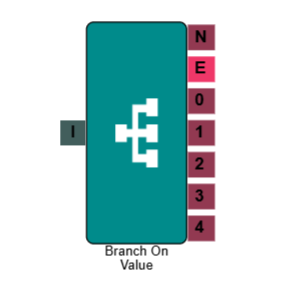
Branch Element
The Branch element routes inbound calls based on the value of a specific data field — such as an inbound number, a lead property, or a value captured earlier in the IVR. Each value you configure creates a separate output path, letting you direct callers to different queues, messages, or flows without building multiple separate IVRs.
This is particularly useful where routing logic depends on data rather than a caller's keypad input. For example, you could route calls to a priority queue based on a customer's account value, or send calls to different teams depending on which of your inbound numbers was dialled.
Connections
| Connection | Description |
|---|---|
| I – Input | The entry point for this element. Connect from the preceding element in your IVR flow. |
| 0, 1, 2, 3… – Values | One output is created for each value you configure. The call routes down the path whose value matches the source field. |
| N – No Match | The path taken when the source field does not match any of the configured values. |
| E – Error | The path taken if the element encounters an error — for example, if the source field cannot be read. |
Settings
| Field | Description |
|---|---|
| Name | Give the element a clear name so it is easy to identify within your IVR flow. |
| Description | Optional. Add a note to explain the element's purpose — useful in more complex flows. |
| Agent Can See This | When enabled, agents can transfer a live caller directly to this element via the IVR Transfer option. |
| Supervisor Can See This | When enabled, the element is visible in the IVR Transfer list for users with a Supervisor role. It remains hidden from all other users. |
| Result Code | Assign a result code to this element to track calls that pass through this branch. |
| Source | The field whose value the element will evaluate. This can be a lead table field, a tag, or a property from an earlier IVR element — for example, call.dnis to check the inbound number dialled. |
| Values | Click Add to define a value and its corresponding output path. Each value creates a new output connection on the element. You can add up to 20 values per Branch element. |
Example
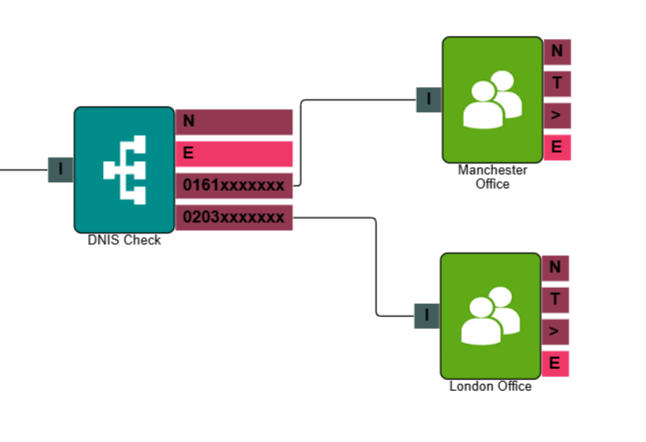
In the example below, the Branch element is configured to check the inbound number the caller has dialled (call.dnis). Each number is mapped to a different queue, so calls are automatically routed to the right team based on which number was used — without the caller needing to make a selection.
Common scenarios
| Scenario | How to set it up |
|---|---|
| Route calls based on the number dialled | Set the Source to call.dnis and add a value for each inbound number. Each value routes the call down a different path. |
| Route based on a previous menu selection or digit entry | Set the Source to the digits captured by an earlier IVR Menu or Capture Digits element. This lets you act on an earlier input without presenting the caller with the same menu again. |
| Route based on an API response | Use the Branch element after an API Request element to evaluate the result and redirect the call accordingly — for example, routing to a different queue based on a customer's account status returned from your CRM. |