
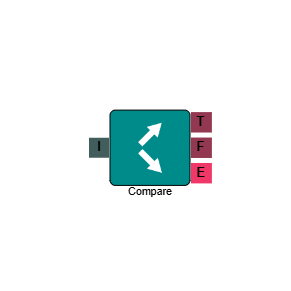
Compare
The Compare element evaluates a value captured earlier in the IVR against a condition you define, then routes the call based on whether that condition is true or false. It is commonly used in payment flows — for example, to check whether an amount entered by a caller meets a minimum threshold before routing them to the appropriate queue.
Connections
| Connection | Description |
|---|---|
| I – Input | The entry point for this element. Connect from the preceding element in your IVR flow. |
| T – True | The path taken when the evaluated condition is met. |
| F – False | The path taken when the evaluated condition is not met. |
| E – Error | The path taken if the element encounters an error — for example, if the source value cannot be read. |
Settings
| Field | Description |
|---|---|
| Name | Give the element a clear name so it is easy to identify within your IVR flow. |
| Description | Optional. Add a note to explain the element's purpose — useful in more complex flows. |
| Agent Can See This | When enabled, agents can transfer a live caller directly to this element via the IVR Transfer option. |
| Supervisor Can See This | When enabled, the element is visible in the IVR Transfer list for users with a Supervisor role. It remains hidden from all other users. |
| Result Code | Assign a result code to this element to track calls that pass through this comparison. |
| Condition | Select the operator to use when evaluating the source value. Available options are: Equal To, Not Equal To, Greater Than, Greater Than or Equal To, Less Than, Less Than or Equal To, and Between. |
| Options | Select the data type the comparison should apply to — for example, whether the value being compared is a number, a string, or a date. |
| Source | Select the IVR element whose captured value will form the left side of the comparison — for example, a Capture Digits element where the caller entered a payment amount. |
| Parameter | Enter the value to compare against. This forms the right side of the comparison. If you select Between as your condition, two parameter fields are shown — enter the lower and upper bounds of the range. |
Example
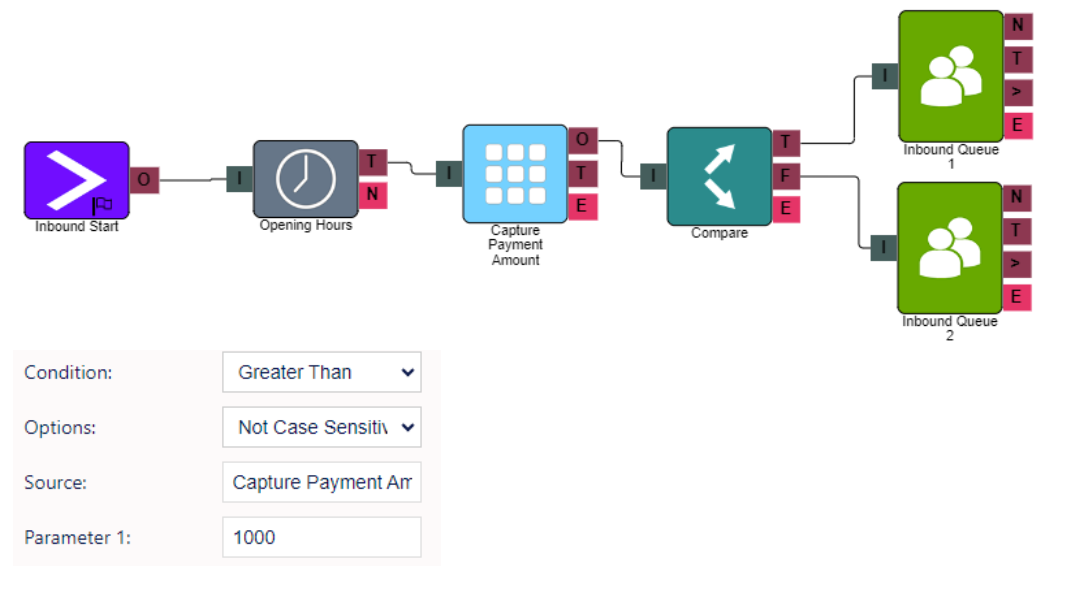
In the example above, a caller enters a payment amount via a Capture Digits element. The Compare element then checks whether that amount is greater than £1,000. If it is, the call routes to a specialist queue via the True (T) path. If not, it follows the False (F) path to a standard queue.