
Script Manager — Settings
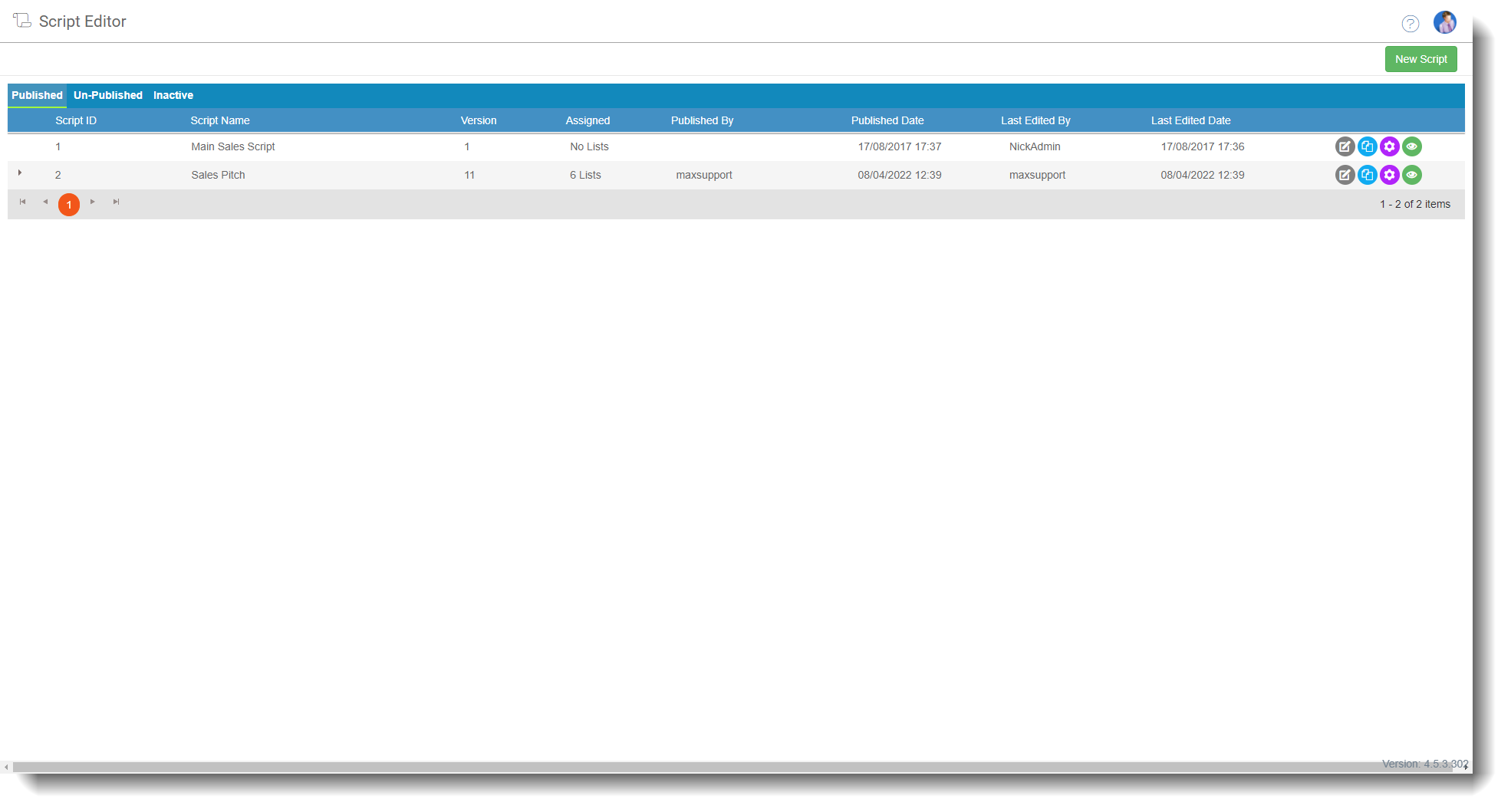
The Script Manager is where you create, manage, and configure your agent scripts. From here you can access the script editor, preview scripts before publishing, set the default inbound and outbound pages, and clone existing scripts for use as templates.
To access it, go to Admin > General > Script Editor.
Script status tabs
The Script Manager displays scripts in three tabs depending on their current status. Select a tab to view the scripts associated with it.
| Tab | Description |
|---|---|
| Published | Scripts that are currently published and may be assigned to lists or campaigns. These are the scripts agents see when on calls or interactions. |
| Unpublished | Scripts that have been created or edited but not yet published to any list or campaign. |
| Inactive | Scripts that have been deactivated. These remain on the system but are not available for use. You can republish a script to make it active again. |
Table columns
The columns displayed vary slightly depending on which tab is selected.
Published and Inactive tabs
| Column | Description |
|---|---|
| Script ID | The unique identifier assigned to the script by the system. |
| Script name | The name of the script. |
| Version | The current published version number. Select the version history icon to view all other versions of the script. |
| Assigned | The number of lists the script is currently assigned to. |
| Last edited by | The name of the user who last edited the script. |
| Last edited date | The date and time the script was last edited. |
Published tab only
| Column | Description |
|---|---|
| Published by | The name of the user who published the script. |
| Published date | The date the script was published. |
Row actions
Each script row has a set of action icons on the right-hand side.
| Action | Description |
|---|---|
| Edit script | Opens the script in the Script Editor. |
| Clone script | Creates a copy of the script. Useful when building a new script based on an existing one. |
| Configure initial pages | Sets the default page shown to agents when they start an inbound or outbound call, and allows you to deactivate the script. |
| Preview script | Lets you view how the script will look and flow without needing to load it as an agent on a live call. |