
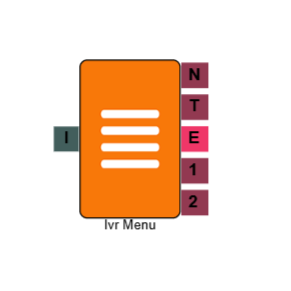
IVR Menu
The IVR Menu element presents a caller with a set of options and routes the call based on the key they press. Each option you configure creates a separate output path, allowing you to direct callers to different queues, messages, or flows from a single menu. It is one of the most commonly used elements in any IVR build.
Connections
| Connection | Description |
|---|---|
| I – Input | The entry point for this element. Connect from the preceding element in your IVR flow. |
| 1, 2, 3… – Options | One output is created for each menu option you configure. The call routes down the path matching the key the caller pressed. |
| T – Timeout | The path taken if the caller does not press a key within the configured timeout period. |
| N – No Match | The path taken if the caller presses a key that does not match any configured option. |
| E - Error | The path taken if an error occurs whilst passing through the element. |
Settings
| Field | Description |
|---|---|
| Name | Give the element a clear name so it is easy to identify within your IVR flow. |
| Description | Optional. Add a note to explain the element's purpose — useful in more complex flows. |
| Agent Can See This | When enabled, agents can transfer a live caller directly to this element via the IVR Transfer option. |
| Supervisor Can See This | When enabled, the element is visible in the IVR Transfer list for users with a Supervisor role. It remains hidden from all other users. |
| Result Code | Assign a result code to this element to track calls that pass through this menu. |
| Clear Digits Buffer | Clicking here will clear all the digits selected on the IVR element (After they have been added). |
| Options | Click Add to configure a menu option. For each option, set the key the caller should press. Each option you add creates a corresponding output connection on the element. |
| Retries | Set how many times the menu phrase replays if the caller does not make a valid selection. Once the retry limit is reached, the call follows the No Match (N) path. |
| Timeout (s) | Set how long the element waits for a keypress before routing the call down the Timeout (T) path. If no timeout path is configured, the menu phrase replays up to the number of times set in Retries. |
| No-Match Phrase | Select the audio file to play, should the caller enter an option that doesn't match to those available in the menu. |
| Phrase | Select the audio file to play to the caller when they reach this menu — typically a recording that lists the available options, such as "Press 1 for Sales, press 2 for Support." |
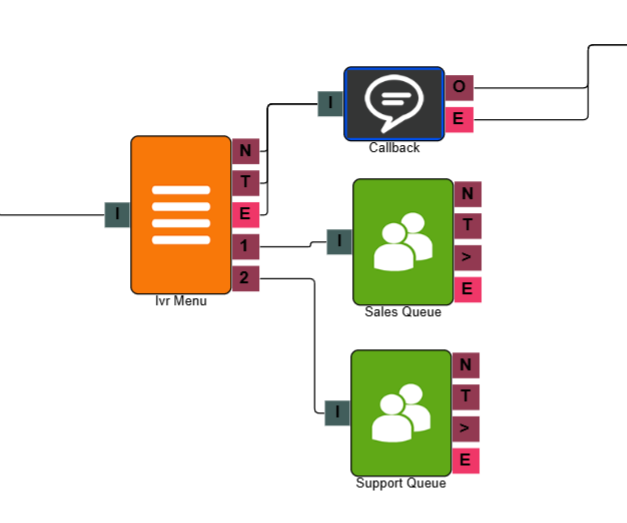
Example
In the example above, the IVR Menu element is configured with two options. Callers are played a phrase prompting them to press 1 for Sales or press 2 for Support. Pressing 1 routes the call to the Sales queue, pressing 2 routes to the Support queue. Callers who do not make a selection within the timeout period are routed down the Timeout path to a message advising them to call back.