
Overview
The Lookup Lead IVR element allows the system to look up a lead using other information besides the inbound phone number the caller may have called from.
Most call centres will want the system to try to automatically match an inbound call with a known outbound Lead, this can be difficult. Callers can call in on anonymous phone numbers/numbers not listed for them and a variety of other reasons which makes it difficult to match the caller with the right Lead.
In such a case, the Lookup Lead element can be used to lookup leads using a phone number or account number the caller enters in a previous step.
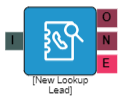
Properties
I = Input
O = Output
N = No Match
E = Error
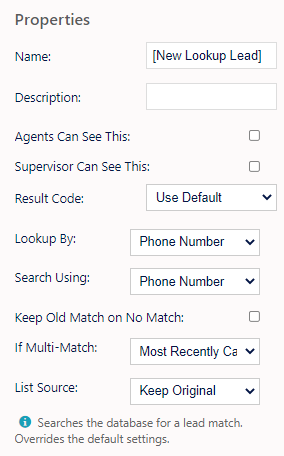
Name, Description - On each IVR element, you can add a name and a description of the element.
Agent Can See This - This makes the element visible to an agent during a live call when they view the IVR/Workflow transfer option, enabling them to transfer the customer into the IVR.
Supervisor Can See This - Anyone with the role type set as 'supervisor' within their main role, will be able to see the option but no-one else.
Result Code - You can assign a result code to the IVR element. This result code will be used upon a customer disconnecting the call while in the element.
Lookup By - Phone Number/Reference ID - Determine which field to look the record up by.
Search Using - Phone Number/Other Property, selecting 'Other Property' will present you with the following input box
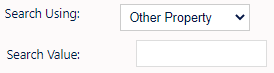
- Search Value - Specify what other property of the call to use for the search value used to lookup the lead. For example; An inbound call where you're asking a customer to enter a reference number. You can set the element name & property here e.g. a set property element.
Keep Old Match On No Match - If ticked and the call already has a lead matched to it either automatically or by another Lookup Lead element, then that match will not be discarded in case a lead lookup using these parameters does not result in a match.
If Multi Match - Will allow you to select from the following options;
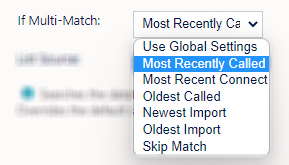
- Follow global settings - Follow the rules set in the inbound settings.
- Most recently called - Match to the lead that was most recently called.
- Skip Match - Agent will decide: Do not pick any leads and let agents or another lead lookup decide.
List Source - This option allows you to set what list you wish the call to report against upon lead match. To Note this is not the list the system will look up against, the system will do a global search unless configured with Tagging.
You can select from the following options;
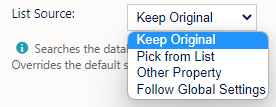
- Keep original - Keep whatever list the call is currently set to.
- Pick from list - Use the list set in the drop down.
- Other property - Use a value that comes from another property of the call.
If selected you will see this box
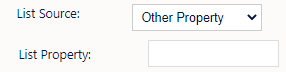
Specify what other property (element name) of the call to use to set the calls list value.
- Use global settings - Follows the rules set by the Global Settings which may use the campaigns default list ID or DNIS routing rules.