
The GetStats IVR element is an IVR element which retrieves statistical data and stores that data in the databin (general IVR data storage) for later usage.
Properties
I = Input
O = Output
E = Error
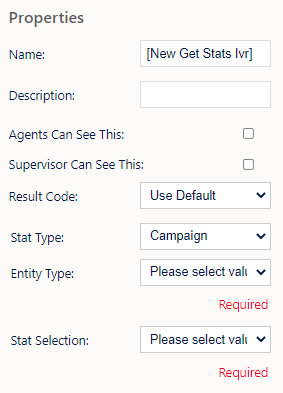
Name, Description - On each IVR element, you can add a name and a description of the element.
Agent Can See This - This makes the element visible to an agent during a live call when they view the IVR/Workflow transfer option, enabling them to transfer the customer into the IVR
Supervisor Can See This - Anyone with the role type set as 'supervisor' within their main role, will be able to see the option but no-one else.
Result Code - You can assign a result code to the IVR element. This result code will be used upon a customer disconnecting the call while in the element.
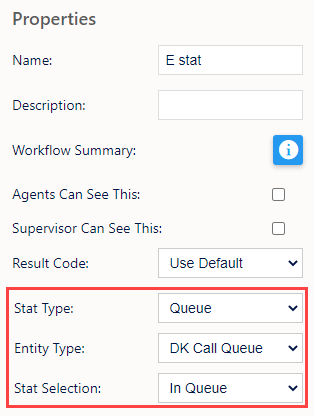
Stat Type - Here you can choose from Campaign, Queue/Skill, List, Team, User.
Entity Type - Allows you to choose one of the relevant choices from the stat type e.g. Choose campaign in Stat Type and you can select the specific campaign in the Entity Type drop-down.
Stat Selection - Allows you to choose the particular stat you want to look at.
Campaign
- Wait Time
- Average Wait Time
Queue/Skill
- Average Queue Time
- Max Queue Time
- Staffed
- Estimated Queue Time
List
- Inbound Calls
Team
- Wait Time
- Average Wait Time
User
- Wait Time
- Inbound Calls
Example;
An example of an IVR setup with Get Stats Ivr Element is as follows:
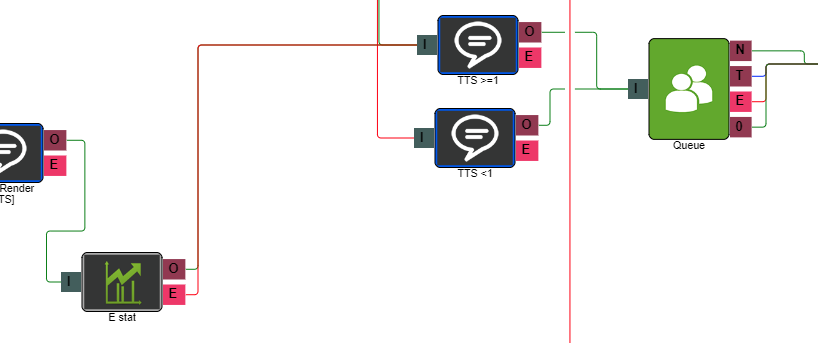
This IVR has the sole functionality of reading back the Get Stats Ivr Element stats via a Text-To-Speech element.
On the Get Stats element properties;
On the Text To Speech element properties;
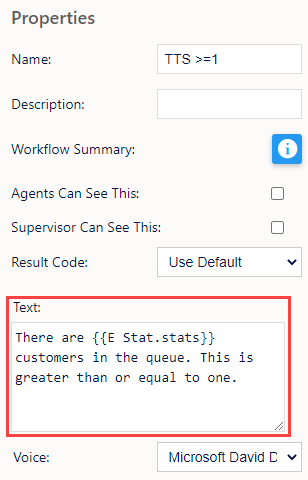
When entering information into a TTS element for playback, you can also use the following options to read back the stat in different formats;
{{Get Stats IVR Element name.stats:stat-millitoseconds}}
plays "[Seconds Number] seconds"
{{Get Stats IVR Element name.stats:stat-millitominutes}}
converts milliseconds to minutes
plays "[Minutes Number] minutes [Seconds Number]"
plays "[Percentage Number] percentage"
plays "[Seconds Number] second"