
The Jukebox rotation setting for IVR's can be used on elements which play multiple audio files and the setting allows you to rotate which audio file is played first to the customer when entering the element.
The Jukebox rotation option is available within the 'Play' and 'Queue' elements.
To explain how this works we'll use the example below.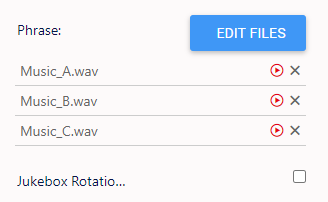
We have three audio files set to play: Music_A, Music_B, and Music_C.
Without Jukebox Rotation enabled, when a customer enters the element, they will first hear Music_A, followed by Music_B, and then Music_C. The system plays the files in order from top to bottom.
If Jukebox Rotation is enabled, the system will automatically rotate which audio file plays first. The rotation follows the same top-to-bottom order. For example:
- After the first rotation, the order will be Music_B, Music_C, Music_A.
- After the second rotation, the order will be Music_C, Music_A, Music_B.
By default, the rotation occurs every three minutes. However, this interval can be adjusted by contacting the support team.